
Dynamic filename
Define the name of the file returned from a recipe.
Create enables admins to define a name for files that the users generate from a recipe. By default, the generated documents share the name of the recipe, but the admins can control this in from the toolbar of the Recipe editor, under the gear menu of Settings → Dynamic filename.
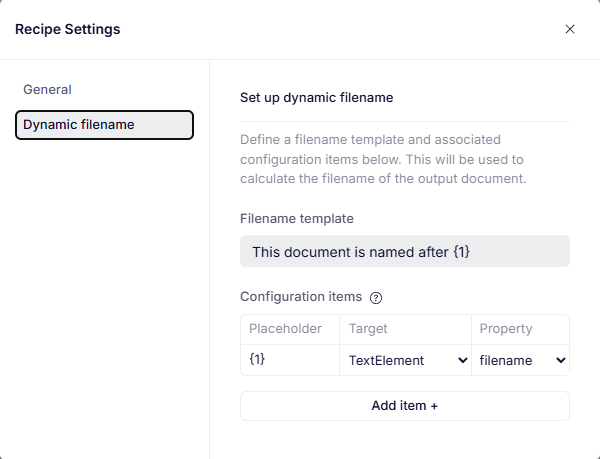
An example dynamic file name.
Currently, the only dynamic elements in the filename can be the filename or a label of a text element inserted via the Recipe Reference field.
Syntax
The Dynamic filename tab contains the Filename template and Configuration items settings.
Filename template
A string that's used as the filename for documents generated from the recipe. The filename template can reference configuration items in order to become dynamic.
Configuration items
A configuration item is a variable that stores a value. It's referenced by its name, which is always of the format {number}. The first configuration item is called {1}, the second {2}, and so on.
The value of a configuration item is chosen by selecting a target RecipeReference form field, and the property of the recipe chosen by the user in that form field, which can be either filename or label.
Example
Consider a recipe for a building permit that contains a RecipeReference field called Resolution with options Approval and Rejection. If you:
- Set the filename template to
Building permit - {1}. - Add a
Configuration item.- Set the
TargettoResolution. - Set the
Propertytofilename.
- Set the
In this case, the filename will be Building permit - Approval if the Approval recipe reference is selected, and Building permit - Rejection if the Rejection recipe reference is selected.
Read more
Follow our how-to guide for setting a dynamic filename to get some guidance on how to reproduce the example described above.
Updated 12 months ago