
General
General settings for your recipes
General settings control how a recipe behaves when generating documents and how users interact with the resulting files.
These options influence data handling, visibility, and document structure after generation.
Note: Not all settings are available in every recipe type.
Record Sample Data
The Record sample data option updates the recipe’s stored sample data each time a user generates a document.
Behavior
When enabled, every document generation replaces the existing sample data with the information provided by the user or integration.
When disabled, the sample data remains unchanged, regardless of user input.
Default and availability
- Default: Disabled
- Available in: Word, HTML, PowerPoint, and Excel recipes
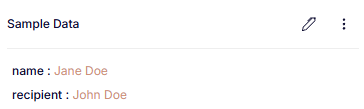
When enabled, we can see that Jane Doe generated a document for John Doe.
Hide from Create
The Hide from Create option controls whether a recipe is visible in the Create user site.
Behavior
When enabled, the document does not appear in the user interface.
Users can still open it manually by selecting Open in Create from the top-left menu.
When disabled, the document appears as usual in the Create interface.
Default and availability
- Default: Disabled
- Available in: Word, HTML, PowerPoint, and Excel recipes
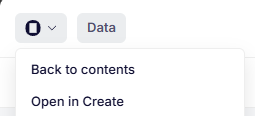
Open a hidden document in Create while setting it up to test the user experience.
Remove Content Controls
The Remove content controls option determines whether Create bindings remain in the generated document.
Behavior
When enabled (and Enable readback is disabled), all content controls used as bindings in the recipe, are removed from the final document. Other content controls remain unaffected.
When disabled, all content controls are preserved.
Default and availability
- Default: Enabled
- Available in: Word recipes
Trim end
The Trim end option removes trailing whitespace at the end of the document.
Behavior
When enabled, extra empty space or blank lines at the end of the document are automatically removed.
When disabled, no change is made.
Default and availability
- Default: Disabled
- Available in: Word recipes
Enable readback
The Enable readback option controls whether data paths are stored in the generated document for debugging or inspection.
Behavior
When enabled, Create keeps all content controls in the generated document and adds a JsonPath property to each binding. This property shows the full data path used by that binding.
When disabled, bindings are left unchanged and no paths are added.
It is generally recommended to keep this option disabled, unless you are troubleshooting or inspecting data flow.
Default and availability
- Default: Disabled
- Available in: Word recipes
Store Form Data in Document
The Store form data in document option determines whether user and integration data are stored inside the generated file.
Behavior
When enabled, Create encrypts the form data and adds it to the document’s custom XML.
This allows other elements, such as text elements or new documents, to access the same data while the document is open in the add-in.
The stored data includes both user-provided values and integration data that may not match form fields.
When disabled, no data is stored in the file, ensuring no information is shared unintentionally.
Default and availability
- Default: Disabled
- Available in: Word, PowerPoint, and Excel recipes
Updated 12 months ago