
Rich html text
Insert html-formatted text into a document
Complexity: Intermediate - requires basic knowledge of HTML formatting and JSON configuration.
Introduction
The Rich html text binding inserts HTML-formatted text into a document.
It allows you to display content that includes rich formatting such as bold, italics, colors, and alignment, directly inside your generated document.
The HTML input does not need to be a full HTML document, but each paragraph must be wrapped in <p> tags to ensure proper rendering.
Example:
- ❌ Invalid:
"This is a text with <b>bold</b> text." - ✅ Valid:
"<p>This is a text with <b>bold</b> text.</p>"
Rich html text binding overview
The Rich html text binding allows you to take structured HTML text and insert it dynamically into a document template.
It interprets standard HTML tags and applies the corresponding Word formatting, so your output matches the look and feel of formatted web content.
You can use RichHtmlText for:
- Displaying user-generated or externally provided HTML content.
- Rendering rich text from a CMS, form field, or integration.
- Applying inline formatting like bold, italics, or lists without creating multiple bindings.
When adding a Rich html text binding in a recipe through the binding editor, the following dialog is shown:
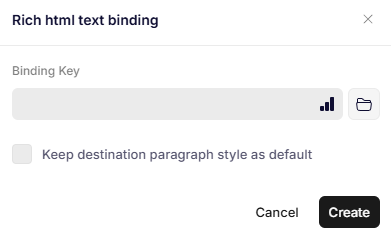
Rich html text binding
Parameters
Binding Key
Specifies the JSON path to the HTML-formatted string that contains the HTML to insert.
Each paragraph in the HTML must be wrapped in <p> tags.
Example:
{
  "Content": "<p>This is a <b>bold</b> and <i>italic</i> sentence.</p>"
}
Keep destination paragraph style as default
If checked, the binding keeps the paragraph style settings from the destination document. If unchecked, then the paragraph style settings defined in the HTML are kept.
The paragraph settings include spacing, alignment and paragraph color.
Inside Word, they are managed in the paragraph toolbar.
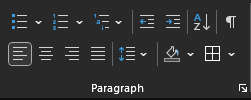
The paragraph toolbar.
Remarks
Read HTML text formatting for complete lists of supported HTML tags in Omnidocs Create and user styles, as well as examples.
Updated 12 months ago