
Migrating from DynamicTemplate to Create
Requirements and changes when migrating to Create from DynamicTemplate.
Prefer Danish? Read this article instead.
This article will dive into what you can expect when migrating from DynamicTemplate to Create and outlines the procedures involved in the migration process.
General changes
When you migrate from DynamicTemplate to Create, several core areas of your solution change. These sections below explain what the changes are and how they affect your setup.
Technology changes
The Create App
As Create is a web application rather than a COM add-in for Microsoft Office, you may interact with Create in various different ways, such as:
- Word Online
- Word Desktop
- Your preferred browser
- An integration
This flexibility ensures that Create is always at your fingertips when you need it, and the experience stays the same across platforms.
File storage
Your files will no longer be stored on a network drive, but will instead be moved to the Omnidocs Cloud.
Template format changes
Create uses the .docx format instead of .dotx or .dotm for templates.
This has several benefits:
.docxis a widely supported standard format.- Your content is easier to manage and reuse.
- There are no embedded macros, which improves security
You do not need to convert your templates manually. The Omnidocs conultants ensure that your templates are implemented in Create with the same functionality and design as currently, unless you choose to update or modernize your setup as a part of the migration.
Changes in the Microsoft 365 add-in
The Create add-in is a web add-in, meaning it will open in a task pane instead of the ribbon.
This layout gives you more space to work and makes navigation easier inside your content.
Training and onboarding
We know that changes in workflow can take time to adapt to.
As a part the migration:
- Your administrators receive training to perform the tasks they do in DynamicTemplate, but in the new Create interface instead.
- Our consultants provide onboarding for new features in Create that may be relevant for your setup.
The migration process
Before the migration beings, a few procedures must be done to ensure that your content moves to Create without loss or conflicts.
The length of the migration depends on the size and structure of your organization, as well as which integrations you are using. Our consultants at Omnidocs will help scope the migration with you and deliver a migration plan.
Below is an overview of the different procedures and processes that take place during the migration.
Template and Standard Content analysis
The first step is to analyze your current setup.
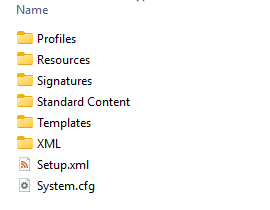
DynamicTemplate folder set
Our consultants will ask for your folder set in DynamicTemplate in order to analyze how you use templates and standard content in your organization. This helps us identify:
- How to structure the migration.
- Which content should be preserved.
- Opportunities to clean up unused or outdated items.
Together we agree on how your templates will be migrated, what functionality to maintain and what to update or remove.
Clean-up and content freeze
Next, we help you clean up your content based on the findings in the analysis.
During this period, a content freeze is required, where users in your organization cannot make changes to your content.
This is to ensure that all templates and configurations are moved consistently.
When your content has been prepared, the migration can begin.
Content migration
There are 4 main areas included in the migration:
- Templates
- Standard Content
- Resources
- Integrations
Templates
The first area of your content that needs to be migrated are your templates.
These will be manually added to Create as recipes, and programmed by our consultants to match the desired functionality and design. During this process, they will be converted to .docx.
Some typical templates we would cover are:
- Letter
- Memo
- Empty with logo
Standard Content
Your standard content will be migrated automatically using internal tools developed by Omnidocs engineers. These tools account for DynamicTemplate field settings and content behaviour to ensure functional equivalence in Create.
After converting your standard content, our consultants will evaluate the output, ensuring everything is as it should be, as well as confirming it with you.
Your folder structure is preserved as a part of this process.
Resources
Resources include logos, campaign texts, graphical elements as well as opening hours.
These are migrated to data sources, which work a bit differently, as they are essentially tables with lookups instead of a folder hierarchy, as you know from DynamicTemplate.
The same logic for applying resources to your documents you use today, is preserved.
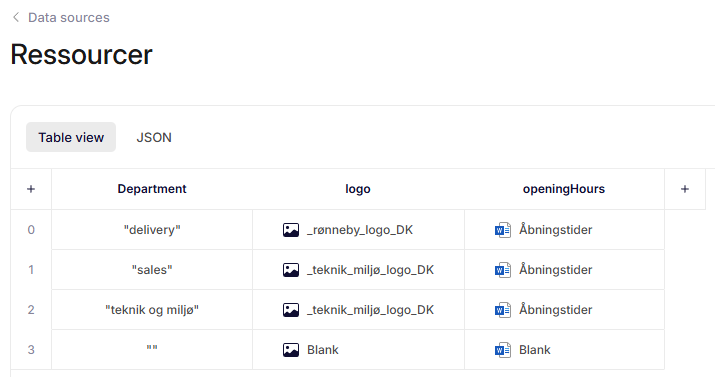
Example of Resources data source
Integrations
The final part of your setup that needs to be migrated are your integrations.
Our consultants at Omnidocs will make sure that the transition will be as smooth as possible. All of your templates and standard content will continue to work with the ESDH or CMS that you are using.
Usually we will have a project surrounding each integration to make sure everything is done by the book, and that any potential concerns are addressed.
Integration fields for each integration will also be created in your environment, enabling your administrators to insert dynamic placeholders in your documents without any extra setup needed.
Migration validation
When migration has taken place, you will enter the migration validation phase.
During this period, we will help verify that everything is operational and working as intended. We also test the new integrations with you and make adjustments, if necessary.
Next steps
Once your content has been migrated and validated, your environment will be fully operational in Create. You can continue working with your templates and standard content while exploring the new capabilities that are available in the platform.
Your administrators will receive training from our consultants during multiple sessions, and these sessions will be tailored to your needs. You can always request additional training if needed.
Updated 11 months ago