
Image
Insert images
Complexity: Intermediate - Requires basic knowledge of JSON for configuration.
Introduction
The Image binding lets you insert images into predefined placeholders in your document.
You can use it to dynamically include logos, signatures, product photos, or other visuals based on the data used when generating a document.
Image binding overview
The Image binding inserts an image into a picture content control.
When adding a Image binding in a recipe through the binding editor, the following dialog is shown:
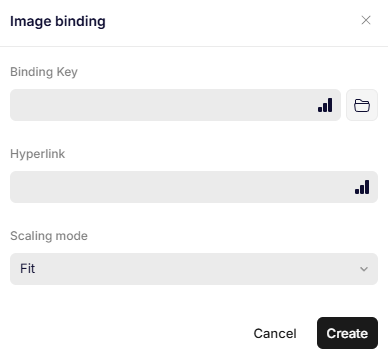
Image binding
Parameters
When configuring the Image binding, you can set the following parameters:
Binding Key
Specifies the path to the value that contain the image data or URL.
Available options are:
- URL – loads the image from a public or authenticated web address.
- Base64 – inserts the image using Base64-encoded data.
- File reference – links to a file from a data source.
Hyperlink
Specifies the path to the value that contains the hyperlink, that will be applied to the image.
Scaling mode
Specifies the way the image will be scaled, when it is inserted.
| Scaling mode | Description |
|---|---|
| Fill | Fills the content control and crops parts of the image that don't fit. The image is compressed. |
| Fit | Scales the image proportionally to fit within the control control. Any empty space is set to transparent. The image is compressed. |
| Raw Fill | Similar to Fill, but uses Word's native cropping feature. This improves performance, but can result in a larger filesize, since the image is not compressed. |
| Raw Fit | Similar to Fit, but uses Word's native cropping feature. This improves performance, but can result in a larger filesize, since the image is not compressed. |
| Stretch | Stretches the image to fill the content control completely. |
Updated 12 months ago