
List
Insert repeatable sections in your documents
Complexity: Intermediate - requires basic knowledge of JSON arrays and data structure paths.
Introduction
The List binding lets you dynamically generate list items in your document for each element in an array of data.
It works almost exactly like the Repeat binding but has one important difference: when used on numbered lists, it continues the numbering instead of restarting it for each repeated element.
This makes the List binding especially useful when generating dynamic numbered lists, such as ordered steps or sections, without losing the natural numbering sequence.
List binding overview
The List binding repeats the content inside the binding once for each element in the array in the data, that it is bound to.
At each repetition, the data scope changes to the next array element, allowing dynamic insertion of text or data for each item.
The key difference from the Repeat binding is how it handles numbered lists:
- The numbering automatically continues across repetitions.
- If text interrupts the list, numbering resumes correctly after the interruption.
When adding a List binding in a recipe through the binding editor, the following dialog is shown:
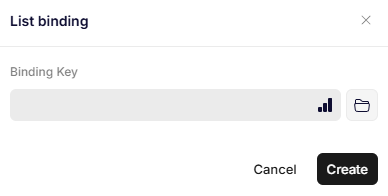
List binding
Parameters
Binding Key
Specifies the JSON path to the array that defines the repeating scope.
Each element of the array represents a new list item that will be generated.
Example:
{
  "MyArray": [
    { "Step": "Prepare the document template." },
    { "Step": "Bind the form fields." },
    { "Step": "Generate and review the document." }
  ]
}
If your binding contains a text binding for Step inside a numbered list, the generated output will look like this:
- Prepare the document template.
- Bind the form fields.
- Generate and review the document.
Updated 12 months ago