
Reference
Insert dynamic tables of content
Complexity: Intermediate — requires basic knowledge of JSON arrays and data structure paths.
Introduction
The Reference binding is used to insert the contents of one or more Bookmark bindings into another part of the document with links.
This makes it possible to automatically generate lists or tables, such as a Table of Contents, by referencing an array of bookmarks that have been defined elsewhere in the document.
Each item in the referenced array represents a single Bookmark, and the Reference binding dynamically includes the content of those bookmarks in the output document.
Reference binding overview
The Reference binding retrieves and inserts content from bookmarks defined by Bookmark bindings.
It reads an array of strings that the Bookmark bindings refer to and renders their contents in order at the location where the Reference binding is placed.
This allows you to dynamically include or list multiple sections of the document, such as:
- A Table of Contents that includes section titles.
- A summary page combining key paragraphs or sections.
- A list of definitions or highlights from other parts of the document.
The Reference binding does not modify or move the original bookmarked content.
Instead, it copies the content from each bookmark dynamically when the document is generated and links to the original position of the bookmark in the document.
When adding a Reference binding in a recipe through the binding editor, the following dialog is shown:
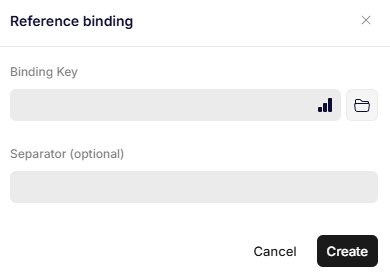
Reference binding
Parameters
Binding Key
Specifies the JSON path to an array that contains the Bookmark bindings, you want to include.
Each index in the array corresponds to a Bookmark binding that surrounds a section of the document.
The Reference binding then iterates through that array and inserts each bookmark’s content in sequence.
Example array:
{
  "myBookmarkCollection": [
    "Bookmark One",
    "Bookmark Two"
  ]
}
In this case the Binding Key for the Reference binding should be myBookmarkCollection.
This would insert the contents of "Bookmark One" and "Bookmark Two" in sequence inside the Reference binding.
Separator (optional)
Defines a string or character that should appear between the referenced bookmarks when multiple bookmarks are included.
This can be used to format or visually separate sections, such as adding line breaks, commas, or dashes.
If this parameter is not specified, a line break is used as the default separator.
Updated 12 months ago