
Lock
Lock parts of the output document for editing
Complexity: Basic - Can be configured entirely through the UI.
Introduction
The Lock binding lets you make parts of a document uneditable after generating.
It’s useful when you want to protect specific sections, such as legal text, disclaimers, or signatures, from being changed by end-users after generation.
You can apply the Lock binding to any content range in your template, including paragraphs, tables, or text blocks.
Lock binding overview
When applied, the Lock binding controls whether the content inside the marked range can be edited.
If the value defined in the binding evaluates as true, the section becomes locked in the generated document.
If it evaluates as false, the content remains editable.
Lock bindings can also be nested. In that case, the closest parent binding determines whether the content is locked.
When adding a Lock binding in a recipe through the binding editor, the following dialog is shown:
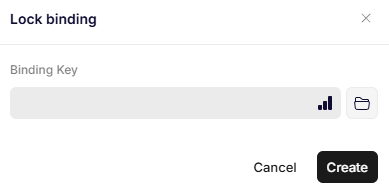
Lock binding
Parameters
Binding Key
Specifies a datapoint that determines whether the content should be locked.
If the data at that path evaluates as true, the section will be locked.
If it evaluates as false, the section will remain editable.
Rules for evaluating data
The following values are validated as false:
- null
- ""
- "false"
- false
- 0 and all negative numbers
{}
All other values are validated as true.
Updated 12 months ago