
Self-hosting Omnidocs Platform (Generic)
Overview
The Omnidocs environment consists of several core services that work together to support the overall functionality:
- Core Services
- Create API, Internal API, and Backup API
- Transformation Service
- JMES Engine
- Templating Services
- Docx, Pptx, Xlsx, Html
- PDF Output Service
- PDF Conversion Engine
For storage, the environment uses both Object/Blob Storage and a MongoDB-based database.
It is also recommended to secure the network boundary using both an Ingress Gateway and an Egress Gateway. This helps protect the system from external threats and simplifies configuration when interacting with external services (e.g., adding firewall exceptions for MongoDB Atlas).
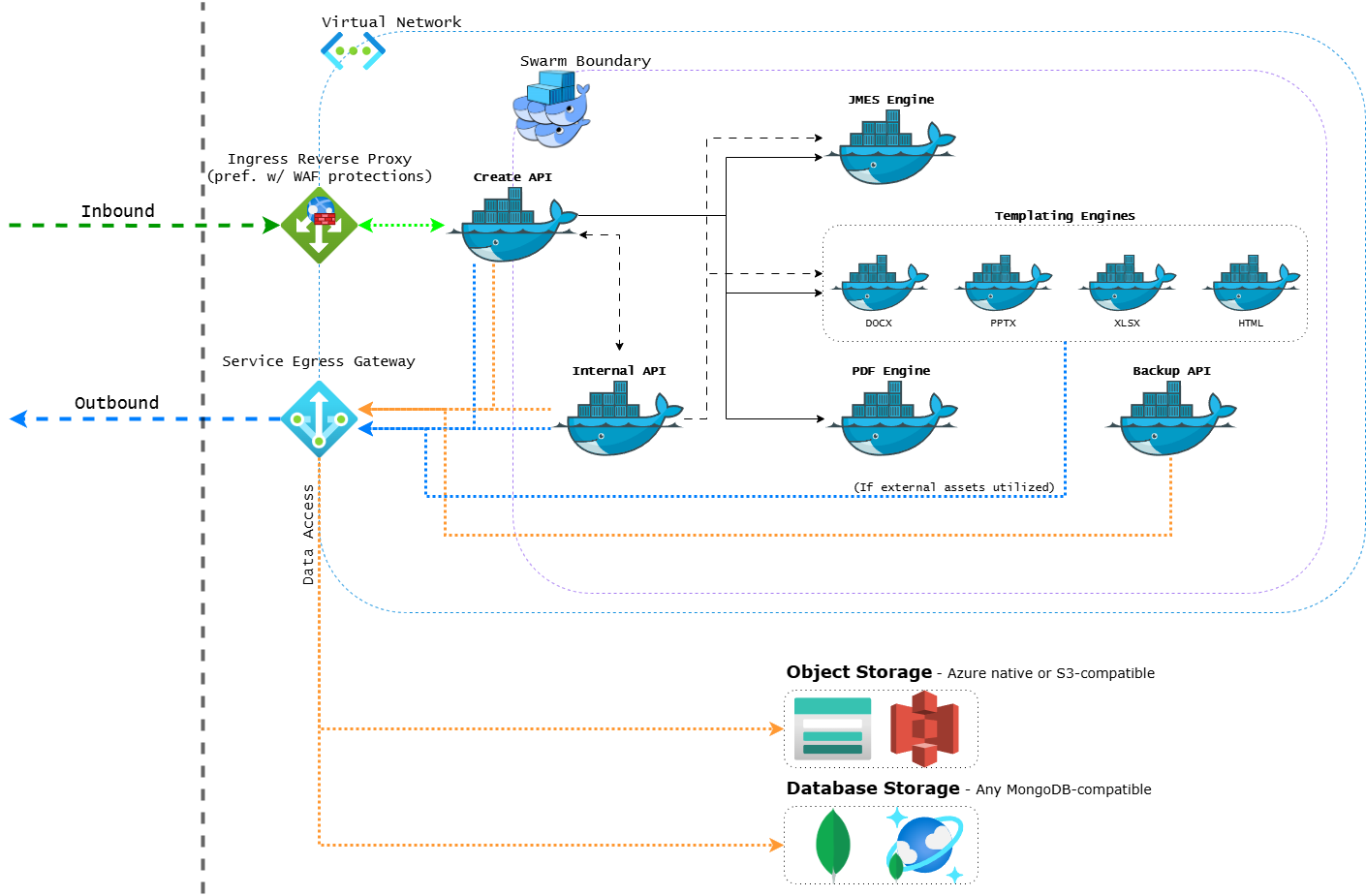
For example, when deploying on Azure, the setup may include:
- Application Gateway: Acts as an inbound reverse proxy with Web Application Firewall protection.
- NAT Gateway: Handles outbound communication through network address translation.
Services
Core Services
Create API
The Create API is the main entry point and orchestrator for the environment. It serves as both the workflow orchestrator, coordinating other services to execute various features (such as generating a document), and as the sole ingress for the system, exposing the complete API surface and WebAssembly clients.
- Inbound Communication: The only service exposed externally for inbound requests.
- Service Dependencies: Requires reachability to all other services and dependencies (excluding Backup API). These endpoints are configured using environment variables.
- Resource Allocation: Due to offloading computational tasks to WebAssembly and templating engines, the service only needs moderate resources to handle typical request loads.
Internal API
The Internal API assists the Create API during specific workflows, such as generating documents and interacting with external data sources. It does not require external inbound access, only outbound communication.
- Service Dependencies: Requires similar discoverability as the Create API.
- Resource Allocation: Comparable to Create API, but with lower overall demand.
Backup API
The Backup API is responsible for executing backup and restore operations on the storage components.
- API Exposure: This service does not expose an API endpoint and does not require discoverability of other services, aside from storage components.
- Resource Allocation: Lightweight, with minimal CPU and memory needs.
Transformation Service
JMES Engine
The JMES Engine processes transformations during the initial phase of a workflow using an extended version of JMESPath.
- Service Dependencies: No service discoverability required.
- Resource Allocation: Low CPU usage but requires substantial memory, with a minimum of 3GB RAM and 1 CPU recommended.
Templating Services
The templating engines are used in the next phase of the workflow. Depending on the type of document being generated, either the Docx engine for Word documents, the Pptx engine for PowerPoint presentations, the Xlsx engine for Excel spreadsheets, or the Html engine for HTML documents is used.
- Service Dependencies: No service discoverability required.
- Resource Allocation: These services are generally lightweight. Office engines require up to 1GB of memory each, while the HTML engine has minimal memory needs.
PDF Output Service
PDF Engine
The PDF Engine is responsible for converting Office and HTML documents to PDF as the final step of a workflow.
- Service Dependencies: No service discoverability required.
- Resource Allocation: CPU-intensive and benefits from having whole number CPU units assigned (e.g., 1 CPU, 2 CPUs) for optimal performance. This ensures efficient resource use, as fractional CPU allocations may not perform adequately. Memory requirements vary based on document complexity.
- Recommendations: Allocate 1 CPU and at least 2GB of memory per instance. This service scales more efficiently horizontally rather than vertically.
- Scaling Guidance: If horizontal scaling is limited, consider increasing memory before adding additional CPUs (up to 2 CPUs). Scaling beyond this number results in diminishing returns.
Storage Dependencies
Object Storage
The environment supports several object storage options:
- Azure Storage: Suitable for deployments in Azure environments.
- S3-Compatible Storage: Useful for non-Azure or third-party environments (e.g., Ceph or MinIO).
- MongoDB GridFS: A fallback solution used when no other object storage is available.
Database Storage
The system relies on a MongoDB-compatible database for structured data storage. Supported options include:
- MongoDB Atlas: A cloud-based managed service.
- Azure CosmosDB for MongoDB: A managed database service offering compatibility with MongoDB.
- Self-Managed MongoDB Instance: A manually maintained setup.
Accessing Container Images
To access the container images required for the Omnidocs environment, please contact your designated technical contact at Omnidocs. They will assist in providing you with an authentication token for our Azure Container Registry, enabling you to pull the necessary images for the various services described in this documentation.
Updated 12 months ago