
Dynamic element
Insert a document into another.
Complexity: Basic - Can be configured entirely through the UI.
Introduction
With Omnidocs Create, it is possible to insert a document into a recipe.
This is especially useful when larger pieces of content are reused in multiple places - for example a Terms and Conditions section.
Dynamic element binding overview
Inserts an existing document into the template - usually by referencing a Recipe Reference field. This document is usually referred to as a text element. The entire paragraph of the binding will be replaced, so it is recommended that the binding is on a separate line in the template.
The binding supports both single select and multi select Recipe Reference fields.
When adding a Dynamic element binding in a recipe through the binding editor, the following dialog is shown:
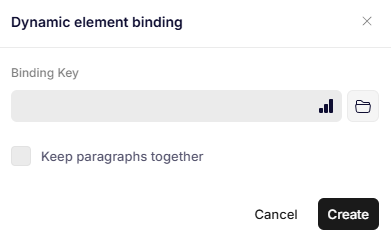
Dynamic element binding
Parameters
Binding Key
A path to a recipe or a collection of recipes from the data set to insert inside of the binding.
Keep paragraphs together
Enables the "Keep with next" setting in Word for each paragraph in the recipe that is being inserted. This means that Word will keep the paragraphs on the same page, which is useful if they are closely related.
Updated 12 months ago