
Repeat
Repeat content inside a binding
Complexity: Intermediate — requires basic knowledge of JSON arrays and data structure paths.
Introduction
The Repeat binding lets you repeat a section of content in your document for each element in an array of data.
It’s especially useful when you need to generate repeating sections dynamically based on multiple data items — for example, a list of participants, products, or project entries.
This binding can also contain nested bindings, allowing you to repeat complex content structures such as paragraphs and tables.
Repeat binding overview
The Repeat binding duplicates the content inside the binding area for each element of the array defined by the input data.
During each repetition, the scope of the data shifts to the current element in the array, allowing you to insert values relative to that element.
This makes it ideal for scenarios where you want to:
- Generate one section per data item (like invoices, contacts, or order lines).
- Display repeated structured content (like dynamic tables or lists).
- Work with nested content — each repetition has its own data scope.
When adding a Repeat binding in a recipe through the binding editor, the following dialog is shown:
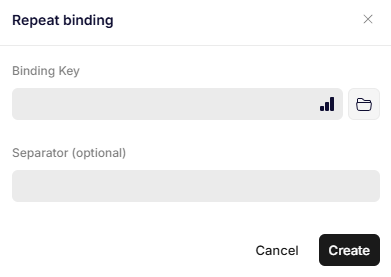
Repeat binding
Parameters
Binding Key
Specifies the JSON path to the array that defines the data to be repeated.
Each element of the array represents one repetition of the content inside the binding.
Example data:
{
  "ArrayPath": [
    { "Name": "Alice" },
    { "Name": "Bob" },
    { "Name": "Charlie" }
  ]
}
Separator (optional)
Specifies a text or character that should be inserted between repeated elements.
This can be used for formatting, such as adding commas or line breaks between repeated items.
Updated 11 months ago