
Branding
Customize appearance in Create
Overview
As an operator, you can control how Omnidocs Create appears for an organization and its child organizations through branding settings. Branding lets you define visual identity elements and support information that users see when they access the platform.
You configure branding at the operator organization level. Your changes apply to all child organizations, as they inherit branding from their parent.
Only operators can manage branding.
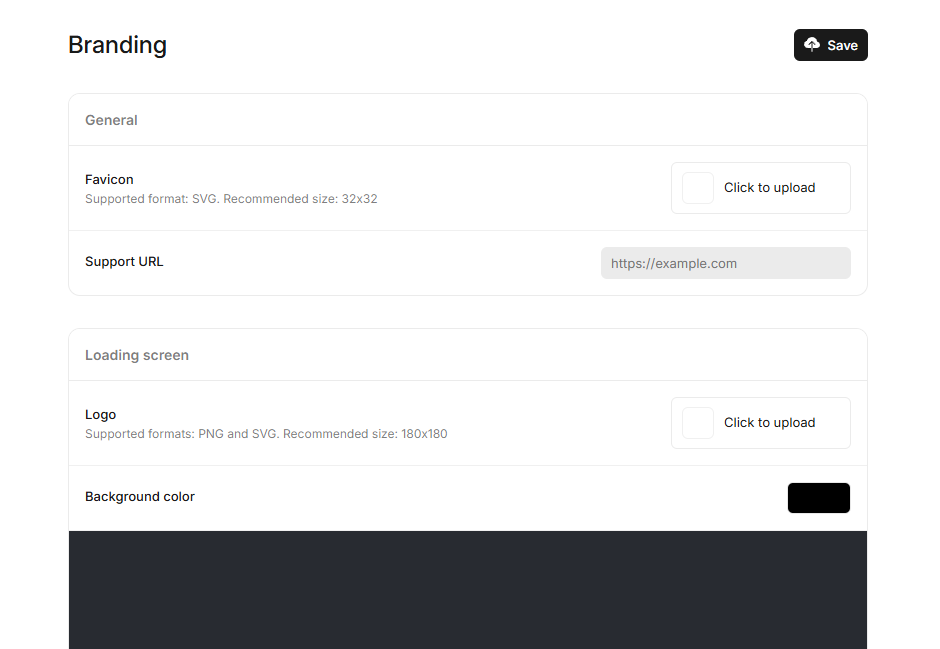
Branding page in Create
What you control with branding
With branding, you control:
- The loading screen appearance
- Which favicon appears in the browser tab
- Where users are sent for support
Branding affects the platform UI only. It does not affect document content, templates or generated output files.
Branding scope
You define branding in an operator organization on a global level.
All child organizations inherit this branding, and the changes apply immediately.
Branding settings
General
Favicon
In this setting you define the favicon shown in the browser tab when users access Omnidocs Create.
Only SVG format is allowed, and the recommended size is 32x32 px. Once applied, the favicon will be visible to all suborganizations.
Choose a favicon that remains recognizable, even at small sizes.
Support URL
Here you define the support URL that Omnidocs Create exposes to users, when they want to get in touch with support.
You typically use this to link to your own helpdesk, instead of sending users directly to Omnidocs.
Make sure the URL remains valid and accessible.
Loading screen
The loading screen appears while Omnidocs Create initializes or loads content.
Logo
This setting defines the logo shown on the loading screen, and not anywhere else.
- Use PNG or SVG format
- Use a recommended size of 180x180
- Optimize the logo for visibility on your chosen background color
Background color
This setting defines the background color behind the loading logo.
Tips:
- Ensure sufficient contrast with the logo
- Use a color aligned with your brand identity
Common branding use cases
You typically use branding to:
- Roll out a unified visual identity across multiple organizations
- White-label Omnidocs Create to fit within your environment visually
Limitations and Notes
- Branding does not affect generated Word, PDF, or HTML documents
- Branding changes apply to all of your suborganizations
- Branding changes immediately upon saving
Updated 6 months ago