
Shared units
Publish content to your organizations
Overview
As an operator, you can mark a unit as shared. A shared unit becomes eligible for publishing to sub-organizations and can serve as a centralized content source across your entire hierarchy.
When you mark a unit as shared, it can be published to sub-organizations.
Its current state can be distributed downstream, meaning you can make changes in the original unit without influencing what has been distributed. When a unit is shared, It becomes visually marked with a green dot in the unit list.
Sharing a unit automatically publishes it at the time the unit was marked as Shared.

Setting for marking a unit as shared
Share, Publish and Unshare a unit
Share a unit
To share a unit:
- Open the unit in the unit list
- Navigate to the Operator section of the settings
- Enable Share unit
- Save your changes
Once enabled, the unit becomes eligible for publishing.
What happens when you share a unit
After sharing:
- The unit receives the green indicator
- The Publishing option becomes visible
- You can distribute the unit to sub-organizations
Sharing does not modify the content of the unit.
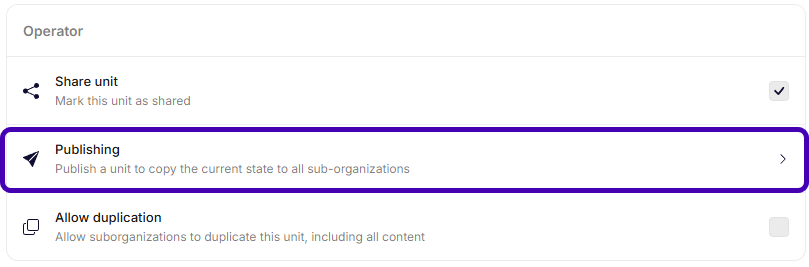
Publishing option is available
Publish a shared unit
After sharing, you can publish the unit to child organizations.
To publish:
- Open the unit in the unit list
- Navigate to the Operator section of the settings
- Select Publishing
- On the publishing page, select Publish
- Choose a time for publishing and confirm.
Publishing copies the current state of the unit to all eligible sub-organizations.
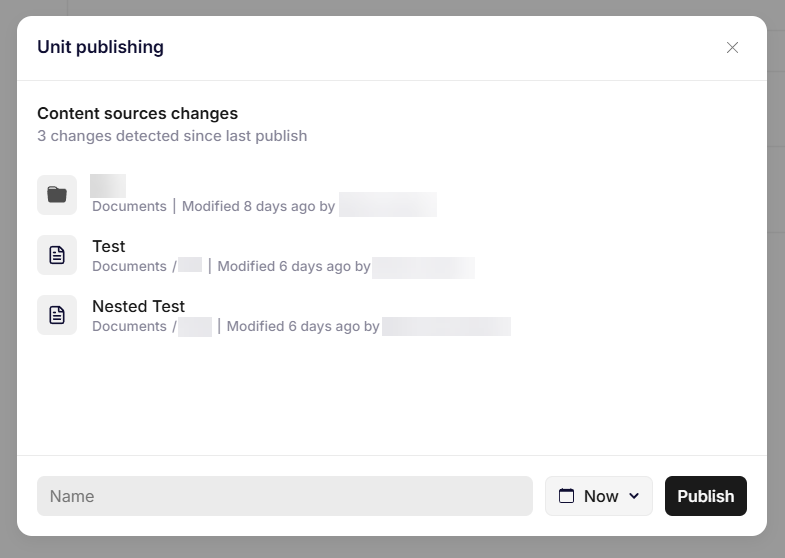
Publishing options
The system captures the state of the unit at the moment you schedule the publish. Changes made after scheduling will not be included unless you reschedule publishing.
Important publishing notes
When you publish:
- The current state is copied
- Changes are not automatically synchronized unless republished
- Sub-organizations receive a snapshot of the unit
- You should verify content before publishing.
Unshare a unit
If you no longer want a unit to be eligible for publishing:
- Open the unit in the unit list
- Navigate to the Operator section of the settings
- Disable Share unit
Unsharing marks the previously published copies in sub-organizations for deletion. Furthermore, it becomes immediately unavailable for all users in the sub-organizations.
Allow duplication
You can optionally enable Allow duplication.
When enabled:
- Sub-organizations can duplicate the shared unit
- The duplicate becomes independent from the original
- Further publishing does not overwrite duplicated versions
Consider it carefully before allowing duplication. It reduces centralized control.
Updated 6 months ago