
Template settings
Configure the settings for your templates
Overview
This article describes the template settings available in Omnidocs Create.
Template settings control certain behavioral and styling aspects of a template. These settings do not affect the document structure itself, but instead define how the template is presented to users and how generated documents are styled.
You can open the template settings from the settings icon (cogwheel) in the top-right corner of the template builder.
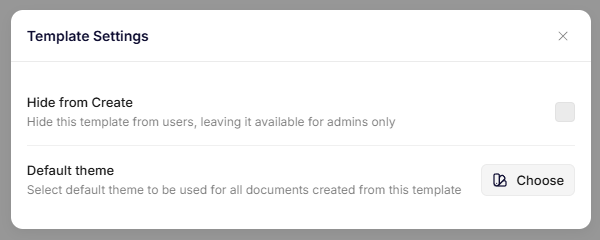
Template settings
Available settings
A template currently contains the following configuration options:
| Setting | Description |
|---|---|
| Hide from Create | Controls whether the template is visible to end users in Omnidocs Create. |
| Default theme | Defines the theme used when generating documents from the template. |
These settings affect how the template behaves when users generate documents.
Hide from Create
The Hide from Create setting determines whether the template is available to users when creating documents.
When enabled:
- The template is hidden from the document creation interface.
- The template remains accessible to administrators.
- The template can still be edited and configured.
This setting is useful when:
- A template is still being configured or tested.
- The template is intended only for administrative use.
- You want to temporarily disable access without deleting the template.
Default theme
The Default theme setting defines which theme is applied when documents are generated from the template.
The selected theme controls:
- Typography
- Colors
- Layout rules
- Element styling
- Headers and footers
When a default theme is set on the template:
- It overrides the unit-level default theme
- It is automatically applied during document generation
- All documents generated from the template will use this theme unless changed
If no theme is selected, the system will fall back to the unit's default theme.
Theme selection behavior
When generating a document, Create determines which theme to apply in the following order:
- Template-level theme
- Unit-level default theme
- System default styling
This ensures that documents always have a defined styling configuration.
Updated 6 months ago